

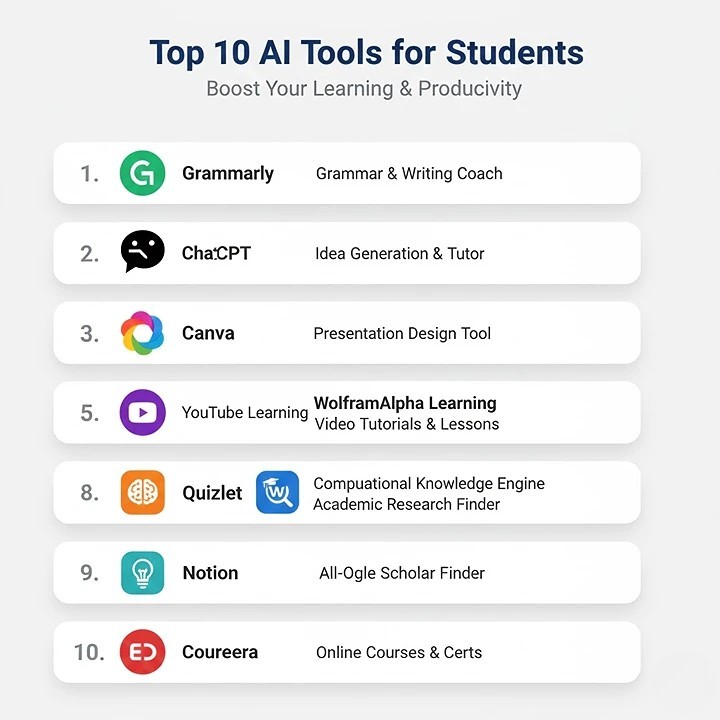
- Grammarly: AI-Powered Writing & Grammar Coach
- ChatGPT: Idea Generation & Tutoring Assistant
- Canva Magic Studio: AI Presentation & Graphic Design
- Google Gemini: Web Research & Information Synthesis
- Otter.ai: Lecture Transcription & Note-Taking
- Notion AI: All-in-One Workspace & Organization
- Quizlet Q-Chat: AI-Powered Interactive Study Buddy
- Elicit: Academic Research & Literature Review Assistant
- Hemingway Editor: Writing Clarity & Readability Tool
- Microsoft Edge Copilot: Sidebar Research & Summarization
Welcome, students! Let’s talk about a game-changer: free AI tools for students 2026. Yes, you read that right. The future of studying is here, and it’s incredibly smart. Moreover, it won’t cost you a single penny. If you’re drowning in deadlines or staring at a blank page, these tools are your new best friends. They are designed to help you research, write, organize, and learn faster. However, the key is to use them wisely as powerful assistants, not shortcuts. Consequently, you can boost your productivity while actually understanding your work better. In this guide, I’ll walk you through the top ten tools that are reshaping education right now. Alright, get ready—this is where your smarter study journey begins.
Firstly, remember that AI is a supplement to your brain, not a replacement. These tools excel at handling the tedious parts of your work. For example, they can summarize long articles or check your grammar in seconds. Therefore, you free up mental energy for critical thinking and creativity. The academic landscape in 2025-2026 is all about working smarter. Let’s explore how you can join this revolution and reclaim your time.
Why Students Absolutely Need AI Tools in 2026
Let’s be honest—student life is a constant juggling act. You have lectures, part-time jobs, social commitments, and mountains of assignments. This is where free AI tools for students 2026 become essential. They supercharge your hard work, making every hour you study far more effective. For instance, instead of spending three hours researching a topic, an AI tool can find key sources in minutes. Instead of struggling with essay structure, an AI can provide a solid outline to build upon.
Furthermore, these tools promote inclusive learning. Students who are non-native English speakers or who have learning differences can find incredible support. AI can help translate complex texts, read materials aloud, or present information in different formats. In the end, the aim is to give every student a fair chance to succeed. Everyone deserves the chance to showcase their intelligence and ideas without being held back by process. These tools provide that crucial support.
1. Grammarly: Your 24/7 Writing Coach
Every student knows the pain of submitting an essay only to find silly typos later. Grammarly solves this forever. It’s far more than a simple spell-checker. This AI-powered writing assistant reviews your grammar, punctuation, tone, and clarity as you type. Its free version is remarkably powerful for everyday academic use.
Key Benefits for Students:
- Real-time Corrections: Fixes errors instantly in documents, emails, and even social media posts.
- Clarity Suggestions: Flags confusing sentences and suggests simpler alternatives.
- Tone Detection: Helps ensure your assignment sounds appropriately academic, not casual.
- Plagiarism Checker: The free version offers limited checks, a must for original work.
Pro Tip: Use Grammarly’s browser extension. It will work wherever you write online, making every piece of communication sharper.
2. ChatGPT: The Ultimate Idea Generator and Tutor
OpenAI’s ChatGPT needs little introduction. Think of it as a versatile brainstorming partner and explainer. Stuck on an essay introduction? Ask for five different options. Don’t understand a complex theory in physics? Request a simple analogy. However, the golden rule is to never copy its output directly. Use it to overcome blocks and gain understanding.
How to Use It Ethically:
- Brainstorming: Generate thesis statements or essay topics.
- Explaining Concepts: Ask it to break down difficult topics step-by-step.
- Outlining: Get a suggested structure for your paper or presentation.
- Self-Testing Practice: Use it to generate practice questions and test your understanding before an exam.
Remember: Always fact-check the information it provides. Treat its output as a first draft, not your finished work.
3. Canva’s Magic Studio: Design Presentations in Minutes
Forget about wrestling with outdated and complicated presentation programs. Canva’s free suite, especially its AI Magic Studio tools, is a lifesaver. Need a presentation on climate change for tomorrow? Describe it to Magic Design, and watch it create a professional draft complete with text and visuals. It turns design anxiety into a fun, quick task.
Standout AI Features:
- Magic Design: Creates full presentations or graphics from a text prompt.
- Magic Write: Helps craft clear, concise text for your slides.
- AI Image Generation: Creates custom graphics and photos for your projects.
- Background Remover: Instantly cleans up images for a polished look.
4. Google Gemini: Your Research and Synthesis Assistant
Deeply integrated into the Google ecosystem, Gemini (formerly Bard) excels at tasks requiring web knowledge. It can access and process current information, making it perfect for research-heavy assignments. Ask it to compare two historical events or summarize recent scientific studies, and it will pull from live data.
Why It’s Great for Research:
- Citation-Friendly: It can often point you directly to source websites.
- Data Synthesis: Can pull together information from multiple articles into a concise summary.
- Integration: Works seamlessly with other Google tools like Docs and Drive.
5. Otter.ai: Never Miss a Lecture Detail Again
How many times have you zoned out in a crucial lecture? Otter.ai is your solution. This transcription tool records audio and writes it down in real-time. The free plan gives you a generous monthly allowance of transcription minutes. Upload a recording of your lecture, and get a searchable, highlightable transcript in minutes.
Perfect for Students Who:
- Have fast-talking professors.
- Want to review complex material at their own pace.
- Need accurate notes for group study sessions.
- Auditory learners benefit from reading spoken words.
6. Notion AI: Organize Your Entire Academic Life
Notion is the all-in-one workspace, and its built-in AI makes it unbeatable. You can manage class schedules, assignment trackers, research databases, and personal journals in one place. The AI helps you write faster, summarize notes, and even create action items from messy meeting notes.
AI-Powered Organization Tricks:
- Summarize Long Notes: Condense pages of lecture notes into key bullet points.
- Generate Action Items: From a project brainstorming session, it can create a to-do list.
- Improve Writing: Polish the text in your project reports directly within your workspace.
7. Quizlet’s Q-Chat: Your AI-Powered Study Buddy
Memorization is key for many subjects. Quizlet’s AI tutor, Q-Chat, transforms passive flashcard review into an active, conversational learning experience. Based on your own study sets, it asks you questions, explains answers you get wrong, and adapts to your pace. It turns studying from a chore into a dialogue.
Study Smarter, Not Harder:
- Adaptive Learning: Focuses on your weak spots.
- Various Formats: Tests you with multiple-choice, true/false, and open-ended questions.
- Always Available: Get instant feedback anytime, anywhere.
8. Elicit: The AI Research Assistant for Papers
Elicit is a specialist. If you’re writing a literature review or a research paper, this tool is a miracle worker. You ask a research question in plain English, and Elicit finds relevant academic papers, summarizes their key findings, and extracts main points. It bypasses hours of database searching and skimming abstracts.
Ideal for University-Level Work:
- Finds Seminal Papers: Quickly identifies key authors and studies in a field.
- Summarizes Abstracts: Saves you from reading hundreds of abstracts manually.
- Organizes Findings: Helps you build a table of research for your paper.
9. Hemingway Editor: Make Your Writing Bold and Clear
Named after the famous concise writer, this free app makes your writing strong and clear. It highlights long, complex sentences, passive voice, and hard-to-read phrases. The goal is to get you to a grade-level readability score, ensuring your arguments are communicated with power and simplicity—a skill every professor admires.
What It Teaches You:
- Sentence Simplicity: Breaks the habit of overly complex academic phrasing.
- Active Voice: Encourages direct, powerful sentences.
- Readability: Ensures your work is accessible and impactful.
10. Copilot in Microsoft Edge: Your Sidebar Research Partner
If you use Microsoft Edge, you have a powerful ally. The built-in Copilot sits in a sidebar. As you read any online PDF or article, you can ask it questions about the content without switching tabs. It can summarize the page, explain concepts, or help you find related information instantly.
The Streamlined Workflow:
- Summarize Articles: Get the gist of a long reading in seconds.
- Explain As You Read: Clarify confusing terms on the same page.
- Generate Ideas: Ask for discussion points based on the text.
How to Use These Free AI Tools for Students 2026 Responsibly
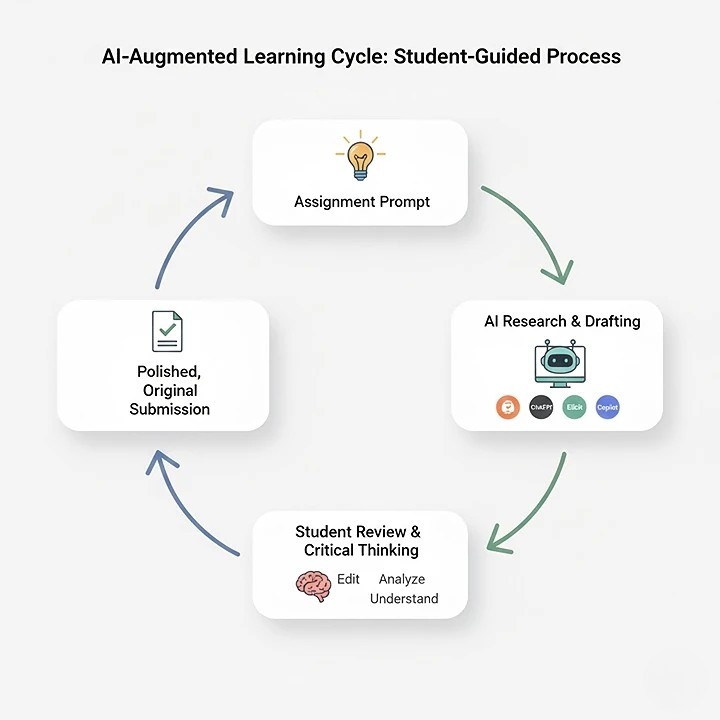
Embracing these tools comes with great responsibility. Firstly, always cite. If an AI generates an idea or phrasing you use, acknowledge it. Secondly, prioritize understanding. Use AI to explain concepts until you grasp them yourself. Thirdly, maintain your voice. Let AI polish your work, not write it. Your unique perspective is what earns top marks.
Furthermore, stay updated. The world of free AI tools for students in 2026 is undergoing rapid evolution. New and better tools emerge constantly. Therefore, remain curious and adapt. Finally, use these tools to create more space in your life—not just for more work, but for deep learning, creativity, and well-being. That is what AI can genuinely offer to the world of education.
