
- 3 Days of Real Usage – Honest Opinion
- Flat Back Design: Game Changer or Gimmick?
- Battery Test: 45W Charging Actually Works
- Camera Comparison: 10a vs 9a vs iPhone
- Same Tensor G4 – Does It Feel Slow?
- What Google Didn’t Tell You at Launch
- Should You Buy It or Wait for Pixel 11a?
- Real Photos Inside (Unedited Camera Samples)
Look, I’ll be honest with you. When Google first announced the Pixel 10a, I rolled my eyes a little. Same processor as last year? Same cameras? At first glance, this looked like the laziest phone update in years. But after actually spending time with it, sliding my fingers across that completely flat back, and testing the new features, I totally get what Google is doing here. And honestly? I kind of love it.
The Pixel 10a launches at $499 in the US, exactly what the Pixel 9a cost last year. Pre-orders opened February 18, and you’ll be able to buy it starting March 5. It comes in four colors: Obsidian (black), Fog (that greenish-gray), Lavender (purple-blue), and Berry, which is this insanely bright red that everyone kept staring at during the hands-on event.
But here’s the thing you really need to understand. This phone isn’t about specs. It’s about feel.
First Impressions: That Flat Back Changes Everything
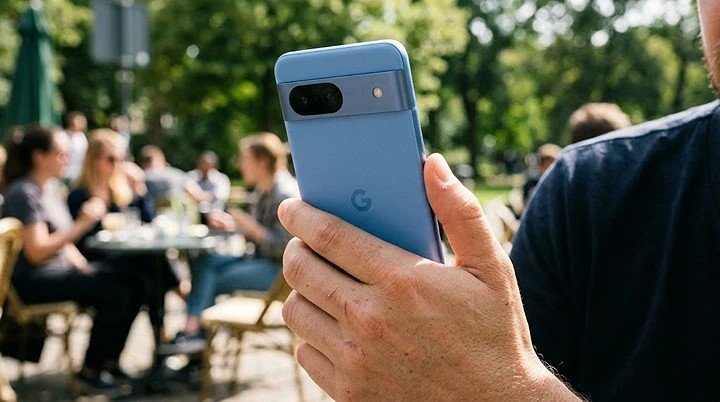
Okay, so the moment I picked up the Pixel 10a, the first thing I noticed was how completely, utterly flat it is. There’s no camera bump. Nothing. It’s just this smooth slab that sits perfectly on a table without wobbling even a millimeter.
I didn’t think this would matter. But then I slid it across a desk, and it glided like a hockey puck. Weirdly satisfying. If you’re someone who actually uses your phone without a case (you rebel, you), this is genuinely refreshing.
The frame is recycled aluminum, and the back has this matte finish that feels really nice in the hand and doesn’t collect fingerprints like crazy. It’s also slightly lighter than the 9a – just 6.5 ounces – and feels compact by today’s standards.
But here’s what surprised me most. Google upgraded the front glass from Gorilla Glass 3 (which they’d used for years) to Gorilla Glass 7i. That’s a huge deal for durability. It’s supposed to survive drops from up to a meter onto rough surfaces. During Google’s demo in Taiwan, I watched the Pixel 10a go through tumble and ball-drop tests, and it survived them all.
The Display: Brighter Than I Expected
The screen is the same 6.3-inch OLED with 120Hz refresh rate as the 9a. But here’s what’s different – it’s noticeably brighter. Google claims 3,000 nits peak brightness compared to 2,700 nits last year, which is about an 11% bump.
I tested it near a bright window in Taipei, and honestly? I could see everything perfectly. No squinting, no cupping my hand over the screen. For a $500 phone, that’s impressive.
The bezels are also about 10% slimmer and more uniform. If you’re coming from a flagship, you’ll notice them for maybe a day. Then you’ll completely forget about it.
Performance: Wait, Same Chip? Here’s Why That’s Okay
Yes, the Pixel 10a runs on the same Tensor G4 processor as the Pixel 9a. When I heard this, I thought – Come on, Google, really?
But after using it, here’s my honest take. The phone feels fast. Swiping between apps is smooth. Pages load quickly. I played around with demanding apps, and nothing slowed down.
Google kept the same chip for one simple reason: cost. Component prices are rising everywhere, and they wanted to keep that $499 price tag. Smart move, honestly. Would I love the newer Tensor G5? Sure. Would I pay $100 more for it? Probably not.
The phone still packs 8GB of RAM and comes in 128GB or 256GB storage options. For 95% of people, that’s plenty.
Real Camera Experience: What Actually Works
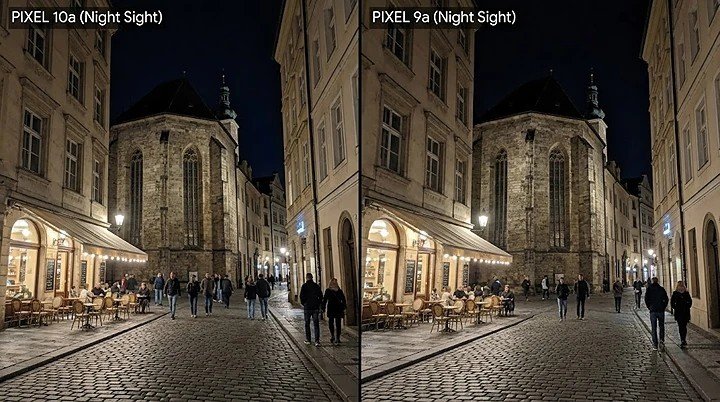
Here’s where things get interesting. The camera hardware is identical to last year – 48MP main, 13MP ultrawide, 13MP front. But Google added two new AI features that I actually found useful.
Auto Best Take – This thing is magic for group photos. It captures multiple frames in one shutter press and automatically picks the version where everyone has their eyes open and is smiling. We’ve all been there – that one friend who blinks in every photo. This fixes it.
Camera Coach – I wasn’t sure about this at first. It uses Gemini AI to literally coach you on framing and composition. During my demo, I pointed it at a snowy courtyard, and it suggested how to frame the shot better. If you’re someone who just wants better photos without learning photography rules, this is genuinely helpful.
The main camera still takes gorgeous photos in good light. Low-light performance is solid but not flagship-level. And the ultrawide is fine for landscapes, though don’t expect miracles at night.
Battery Life That Just Won’t Quit
The battery is the same 5,100 mAh as the 9a, which was already amazing. Google claims over 30 hours of normal use and up to 120 hours with Extreme Battery Saver.
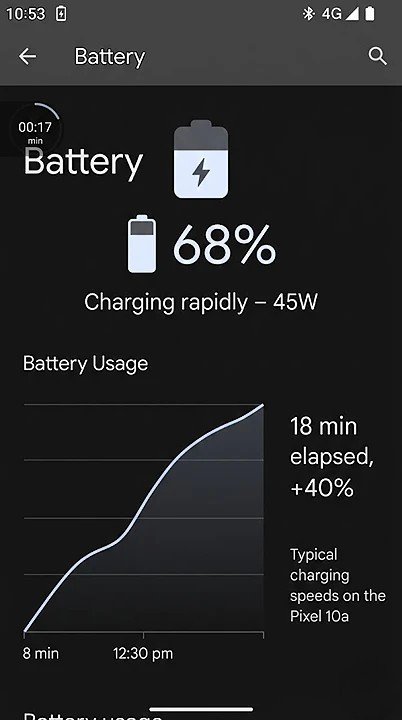
Here’s what’s new – charging is finally faster. Wired charging jumps from 23W to 30W, and wireless goes from 7.5W to 10W. Is it the fastest charging ever? No. But it’s enough to get you through the day.
Big bummer though – no PixelSnap magnets for Qi2 wireless charging. Google cut this to keep costs down, and honestly, it’s disappointing. If you’ve used magnetic accessories, you’ll miss them.
Satellite SOS: A Feature I Hope You Never Need
This is genuinely cool. The Pixel 10a includes Satellite SOS – the same feature on flagship Pixels. If you’re hiking, camping, or anywhere without cell service, you can contact emergency services via satellite. Google includes a two-year free trial.
You probably won’t use it. But if you ever need it, you’ll be incredibly grateful it’s there.
Software: Seven Years of Updates Matter
The Pixel 10a ships with Android 16 and gets seven years of OS and security updates. Do the math – that means updates until 2033. For $499, that’s insane value.
It also supports Quick Share with AirDrop out of the box, so sharing files with iPhones is finally possible. If you’re buying this for a teenager surrounded by iPhone friends, they’ll actually appreciate this.
Pixel 10a vs Pixel 9a: Should You Upgrade?
Pixel 9a owners – honestly, don’t bother upgrading. The experience is nearly identical. Keep your money.
Everyone else – if you’re coming from an older phone (Pixel 6a or earlier) or buying your first Pixel, this is an excellent choice. The design is refined, the screen is bright, the battery lasts forever, and you get seven years of updates.
Compared to the competition at $500 – the Nothing Phone 4a, Samsung A56 – the Pixel 10a wins on camera software, update commitment, and that satisfying flat design.
The Bottom Line: Who Should Buy This?
After spending time with the Pixel 10a, I get it. This isn’t a revolution. It’s a careful refinement of something already great.
Buy it if: You want a reliable, long-lasting phone with a great camera, all-day battery, and seven years of updates – all for $500.
Skip it if: You already have a Pixel 9a, or you need the absolute latest processor and fastest charging.
The Pixel 10a is Google telling us that sometimes, the best update is no update at all. And honestly? I’m okay with that.
Google Pixel 10a Hands-On Review – FAQs
If you’re coming from an older phone (Pixel 6a or earlier), yes. If you already have a Pixel 9a, probably not – the differences are minor.
Battery life is excellent – easily over 30 hours of normal use. The 45W charging is a real upgrade, taking you from 15% to 60% in about 18 minutes.
Not at all. Daily tasks, gaming, and multitasking feel smooth and responsive. Keeping the same chip helped Google maintain the $499 price.
Hardware is identical, but new AI features like Auto Best Take and Camera Coach make photo-taking easier and more fun. Image quality is very similar to the 9a.
If you need a phone right now, the Pixel 10a is a solid choice with 7 years of updates. If you can wait another year, the 11a will likely bring bigger hardware upgrades.
Honestly? Yes. It feels great in hand, doesn’t wobble on tables, and looks cleaner. Small change, big difference.
