
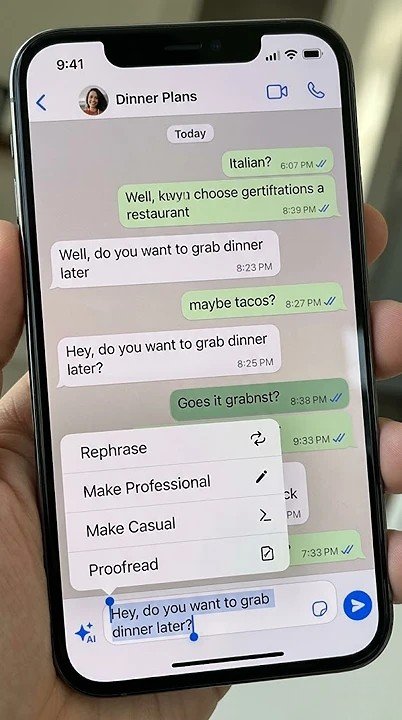
- AI Writing Help for Smart Message Suggestions
- AI Image Editing: Remove Objects & Change Backgrounds
- Usernames Finally Roll Out (Hide Your Phone Number)
- 4-Digit Username Key for Extra Security
- Status Updates Moving to Chats Tab (Like Instagram Stories)
- Per-Chat Storage Management: Delete Media, Keep Text
- Two WhatsApp Accounts on One iPhone (Finally)
- Cross-Platform Chat Transfer (iPhone ↔ Android)
- WhatsApp Business New Pricing & Tools 2026
- Meta AI Tab Coming Soon to WhatsApp
- Complete Summary Table of All 2026 Features
WhatsApp has changed a lot this year. If you haven’t opened the app recently, you might be surprised. The Meta-owned messaging platform added artificial intelligence tools, a long-awaited username feature, and several privacy upgrades. These updates arrived in early 2026, and more are coming soon.
Let me walk you through everything new on WhatsApp. I have gathered fresh information from multiple reliable sources. Everything you will read here is current as of April 11, 2026. Whether you use WhatsApp for personal chats or business communication, this guide covers what matters most.
WhatsApp Now Has AI Writing and Editing Tools
WhatsApp finally integrated artificial intelligence directly into the app. This is a big deal. Previously, users had to copy text to external apps like ChatGPT for help. Now, everything happens inside WhatsApp.
How AI Writing Help Works
The feature is called “Writing Help.” It lives right in the chat bar. When you type a message, you can tap a special icon. It looks like a pencil with sparkles around it.
Here is what the AI can do for you:
- Rephrase your message in a different tone
- Proofread before you hit send
- Adjust the style from casual to professional
- Suggest full replies based on conversation context
The AI reads your conversation history to understand what you are talking about. Then it offers relevant suggestions. For example, if someone asks about dinner plans, the AI might suggest, “How about pizza at 7 PM?”
Image Editing with Meta AI
WhatsApp also added AI image editing tools. You can now:
- Remove unwanted objects from photos
- Change or replace backgrounds
- Apply different visual styles to your images
All these edits happen directly within the chat window. No need to open another app. The tools use Meta’s own AI models to process your media.
Privacy Concerns? Here is the Good News
Meta says these AI features do not compromise your privacy. The company claims chats remain end-to-end encrypted even when you use Writing Help. The AI examines your messages to create recommendations. However, your actual chat content remains secure and private.
However, there is a catch. These AI capabilities are only available in countries where Meta has officially launched its AI services. Regulatory approval varies by region. So some users may not see these features yet.
Usernames Finally Arrive on WhatsApp
This is the feature users have wanted for years. After years of waiting, WhatsApp has started introducing usernames to its users. You no longer need to share your phone number with everyone you message.
How WhatsApp Usernames Work
The feature started rolling out in early April 2026. Currently, it is available to a limited number of Android and iOS users. The company plans to expand availability to everyone sometime in the coming months.
Here are the key rules for usernames:
- Length must be between 3 and 35 characters
- Must contain at least one alphabet (no numbers or symbols only)
- Can include underscores, periods, and lowercase letters
- Cannot start with “” or end with “.com”, “.in”, etc.
Your phone number is still required to use WhatsApp. But you do not have to share it with new contacts. Instead, share your username.
Extra Security: The Username Key
WhatsApp added another layer of protection. Users can create a 4-digit username key. Someone who wants to message you needs both your username and this key. This makes unwanted messages much harder to send.
You can also use your existing Facebook or Instagram username on WhatsApp. The platform will let you confirm ownership through the Accounts Center.

Status Updates Are Moving to Your Chats Tab
WhatsApp has kept Status updates hidden for eight years. That is changing now. The company is testing a major redesign.
The New Status Location
Instead of a separate Updates tab, Status will soon appear at the top of your Chats list. You will see a horizontal row of circular avatars. This looks very similar to Instagram Stories.
Here is how it works:
- Friends with new Status updates appear first
- The order is based on how often you interact with each contact
- You can swipe down to access the full Status tray
- Muted contacts go to the end of the list
Why Is WhatsApp Doing This?
Meta wants to make Status more visible. Currently, very few users actively post Status updates compared to Instagram Stories. By moving Status to the main chat screen, Meta hopes more people will use it.
The design copies Telegram. Telegram added a similar Stories feature in 2023, and user engagement exceeded expectations. WhatsApp is following a proven model.
What Stays the Same
Status updates still disappear after 24 hours. You can still add stickers, text, music, and effects. And most importantly, Status remains end-to-end encrypted. Instagram Stories are not encrypted.
The feature is still in testing. It appears in both iOS and Android beta versions. The company has not yet shared any confirmed launch date.
Storage Management Gets Smarter
WhatsApp can now help you free up space more intelligently. Instead of wiping entire conversations, you can be selective.
Per-Chat Storage Controls
You can now manage storage on a per-chat basis. Open any chat, go to storage settings, and see exactly which files take up the most space. Then choose to delete only media files while keeping the text message history.
This is especially useful for users in many group chats. Those groups often accumulate hundreds of photos and videos.
Smart Recommendations
The app can now detect usage patterns. If a chat exceeds 80% of its average storage capacity, WhatsApp will suggest cleaning it up. This happens in real time as you use the app.
iOS Finally Gets Android Features
iPhone users have been waiting for two specific features. They are finally here.
Two Accounts on One iPhone
You can now run two different WhatsApp accounts on the same iPhone. This makes it easy to separate personal and business numbers. Android users have had this ability for years.
Cross-Platform Chat Transfer
WhatsApp now officially supports moving chat history between operating systems. You can transfer all your data from iPhone to Android and back without losing anything. This was previously impossible.
WhatsApp Business Updates for 2026
WhatsApp is also improving its Business platform. Several changes affect how companies communicate with customers.
New Pricing for Business Messages
WhatsApp now charges businesses for sending marketing messages. The charges range from $0.05 to $0.09 per message, depending on the country. Businesses can respond to customer messages for free for up to 24 hours. After that, charges apply.
Meta has released updated per-message rate cards for multiple countries, including India, Pakistan, Saudi Arabia, and Turkey.
New Communication Tools
WhatsApp Business now offers three new tools:
- Click-to-chat buttons on websites and Facebook ads
- Real-time support directly within WhatsApp
- Instant information retrieval from business websites
These tools aim to replace phone calls and emails for customer service.
What Is Coming Next?
WhatsApp is testing even more features. Here is what to expect soon.
Meta AI Tab
Some beta users see a dedicated Meta AI tab at the bottom of the app. This centralizes all AI tools in one place. The Communities tab has been removed to make space.
WhatsApp Groups API
Businesses can now programmatically create and manage groups using the WhatsApp Groups API. This is useful for large organizations managing many customer communities.
Multi-Solution Conversations
Marketing messages can now include multiple solutions in a single conversation. This helps businesses handle complex customer inquiries more efficiently.

Summary: All WhatsApp 2026 Updates at a Glance
| Feature | Status | What It Does |
|---|---|---|
| AI Writing Help | Rolling out now | Suggests and rewrites messages |
| AI Image Editing | Rolling out now | Removes objects, changes backgrounds |
| Usernames | Limited rollout | Hide your phone number |
| Username Key | Limited rollout | 4-digit security code |
| Status in Chats Tab | Testing | Status updates at the top of the chat list |
| Per-Chat Storage | Available | Delete media from specific chats |
| Two Accounts on iOS | Available | Personal + business on one phone |
| Cross-Platform Transfer | Available | Move chats between iPhone and Android |
Final Thoughts
WhatsApp in 2026 looks very different from last year. The app is no longer just a simple messaging tool. It now includes AI assistance, better privacy controls, and smarter storage management.
The username feature is the biggest win for privacy. You can finally connect with new people without exposing your phone number. The AI tools are helpful for writing better messages and editing photos quickly. And iOS users finally get features Android has enjoyed for years.
Some changes may feel overwhelming. Moving the status to the main chat screen could annoy users who prefer a clean, simple interface. But the option to ignore it remains.
My advice? Update your WhatsApp app today. Try the new AI writing tool. Set up your username. And check your storage settings to clean up old files. These small changes will make your daily messaging experience much better.
WhatsApp 2026 – Frequently Asked Questions
| Question | Short Answer |
|---|---|
| New AI features? | AI Writing Help + AI Image Editing |
| Status moving to the Chats tab? | Settings > Privacy > Username |
| Status moving to Chats tab? | Yes, currently in beta testing |
| Two accounts on iPhone? | Yes, finally available in 2026 |
| Still private? | Yes, end-to-end encryption remains |
